Does eSIM work in China? Can you use Google, WhatsApp and Instagram? Here's the complete, honest answer — no fluff, no marketing spin.
Last updated: May 2026 | 8 min read

China is one of the most extraordinary travel destinations in the world — and one of the most digitally confusing. Before your trip, you'll likely spend hours going down a rabbit hole of conflicting advice about VPNs, blocked apps, SIM cards, and eSIMs.
This guide cuts through all of it. We'll explain exactly how internet access works in China as a foreign tourist in 2026, why a travel eSIM is the cleanest solution, which apps work and which don't, and what you need to set up before you board the plane.
First: Understanding the Great Firewall

China's internet is fundamentally different from the rest of the world. The government operates a sophisticated censorship and filtering system known as the Great Firewall (防火长城), which blocks access to thousands of foreign websites and apps at the network level.
This applies to every internet connection routed through a Chinese network — mobile data on a local SIM, hotel Wi-Fi, café Wi-Fi, airport Wi-Fi. If the traffic goes through a Chinese ISP, the firewall applies.
What's blocked in mainland China:
| App / Service | Blocked? |
|---|---|
| Google Search, Gmail, Maps, Drive | ❌ Blocked |
| ❌ Blocked | |
| ❌ Blocked | |
| Facebook & Messenger | ❌ Blocked |
| YouTube | ❌ Blocked |
| Twitter / X | ❌ Blocked |
| Telegram | ❌ Blocked |
| BBC, NYT, Bloomberg | ❌ Blocked |
| Netflix | ❌ Blocked |
| ChatGPT | ❌ Blocked |
| ✅ Works | |
| Alipay | ✅ Works |
| Didi | ✅ Works |
| Apple Maps (iPhone) | ✅ Works |
| Amap / Gaode Maps | ✅ Works |
Important: Hong Kong and Macau operate under "One Country, Two Systems" and are not subject to the Great Firewall. If your trip includes Hong Kong, the internet works normally there.
Does eSIM Work in China? Yes — Here's Why It Bypasses the Firewall

Here's the key insight that most travel blogs explain poorly or get wrong entirely:
A travel eSIM bypasses the Great Firewall automatically — not because of a built-in VPN, but because of how international roaming works.
When you use a travel eSIM like the OvoSIM China eSIM, your phone connects to a Chinese cell tower for signal — but your actual data traffic is routed through an international gateway (typically Hong Kong or Singapore) before it ever touches the Chinese internet infrastructure.
The Great Firewall only filters traffic inside China's domestic network. Your data exits through an international gateway first, so it never hits the firewall at all.
This means:
- ✅ Google works
- ✅ WhatsApp works
- ✅ Instagram works
- ✅ YouTube works
- ✅ Gmail works
- ✅ No VPN setup required
The "built-in VPN" myth: Some providers market their China eSIM as having a "built-in VPN." This is a marketing label, not a technical feature. Every travel eSIM routes through international roaming — that's what bypasses the firewall. You don't need to specifically choose one that advertises VPN functionality. They all work the same way.
Do You Still Need a VPN?
For your mobile data connection, no — your eSIM handles that automatically.
However, there are two situations where having a VPN installed is still useful:
- Hotel or café Wi-Fi: These networks route through Chinese ISPs and are subject to the firewall. If you connect to hotel Wi-Fi to save data, a VPN lets you access blocked apps on that connection.
- Specific privacy needs: If you need your traffic to appear as if it's coming from a specific country, a VPN provides that on top of your eSIM connection.
If you want a VPN as backup: Download and install it before you leave home. VPN app websites and many VPN apps themselves are blocked in China — you can't easily download one after you arrive. ExpressVPN and NordVPN are the most commonly used options for China travel.
The short version: eSIM for mobile data = no VPN needed. Hotel Wi-Fi = VPN useful.
Must-Install Apps Before You Fly to China
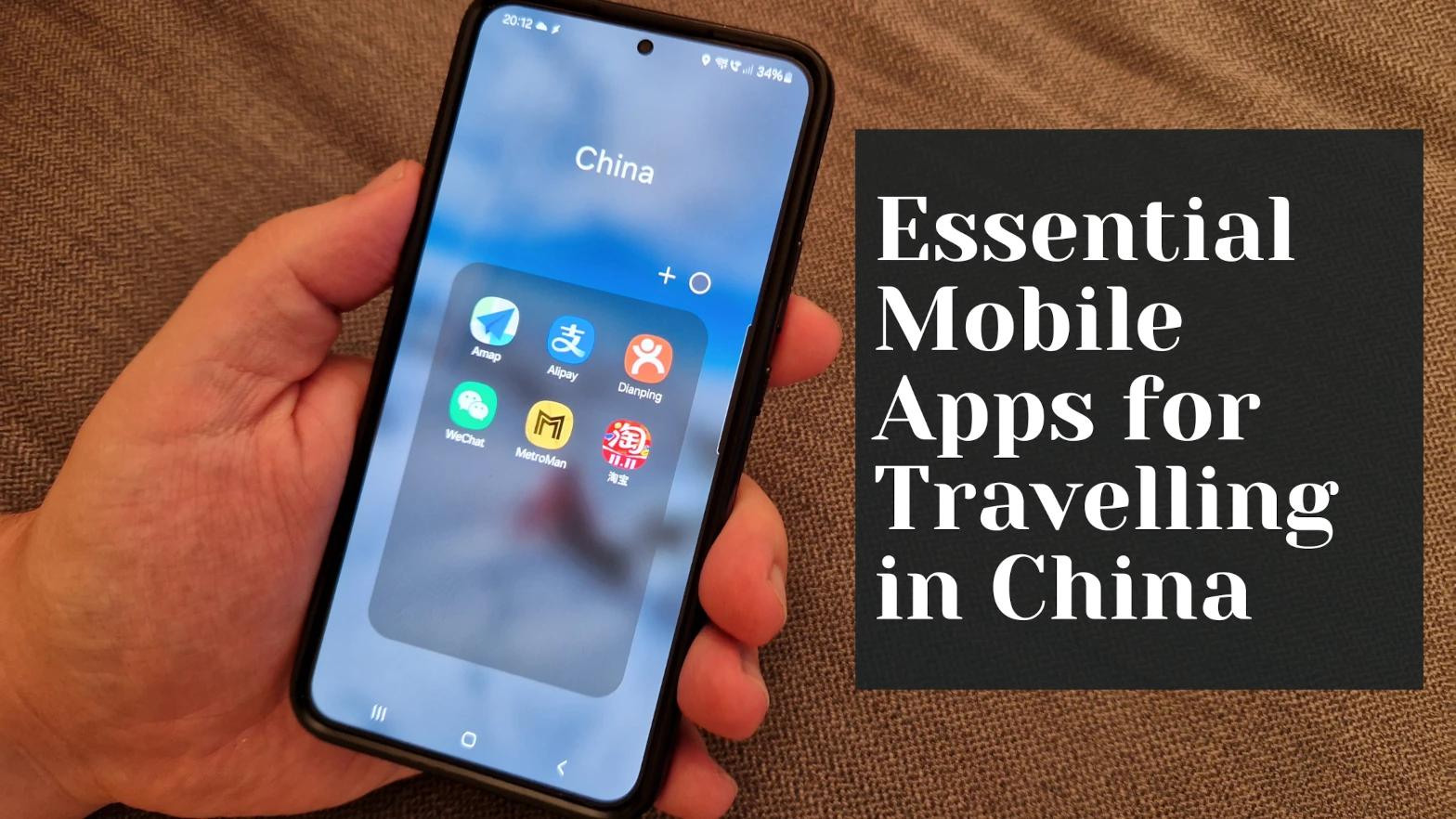
This is the section most travelers wish they'd read before landing. China runs on a completely different app ecosystem, and several of these cannot be set up from within China — you need to do it while you still have unrestricted internet access at home.
Alipay — Your Primary Payment Method
China is overwhelmingly cashless. Street food stalls, taxis, supermarkets, tourist attractions — almost everything runs on QR code payments. Alipay is the dominant platform and now supports foreign cards (Visa, Mastercard) for international visitors.
Set up before you fly:
- Download Alipay and create an account using your international phone number
- Add your foreign credit or debit card
- Complete identity verification using your passport
- Note: there may be small transaction fees on larger payments with a foreign card
WeChat — Essential for Communication
WeChat is China's everything-app: messaging, payments, mini-programs (apps within the app), and more. Even if you use Alipay for payments, you'll want WeChat for communicating with locals, hotel staff, and tour operators.
- Download and register using your home phone number
- Set up WeChat Pay as a backup (link your foreign card — process is similar to Alipay)
- Download before arriving — some verification steps require access to services blocked in China
Didi — Getting Around
Didi is China's dominant ride-hailing platform, similar to Uber. It has an English interface and works with foreign cards and Alipay. You do not need a Chinese phone number to use Didi — your home number works for registration.
Pro tip: The easiest way to use Didi is directly inside the Alipay app as a mini-program. Payment is already linked, it's in English, and you don't need to download a separate app.
Maps
- iPhone users: Apple Maps works well in China for navigation and transit
- Android users: Download Amap (高德地图 / Gaode Maps) — the gold standard for China navigation with accurate local data, transit routes, and real-time traffic
- Google Maps: Works with your eSIM data connection, but map accuracy inside China is deliberately offset for regulatory reasons. Use it for general orientation, not turn-by-turn directions
Translation
- Google Translate: Works with your eSIM. The camera/image translation feature is incredibly useful for menus, signs, and labels — download the Chinese language pack for offline use
- Pleco: The best Chinese dictionary app, works fully offline
What to Set Up Before You Land: The Complete Pre-Flight Checklist
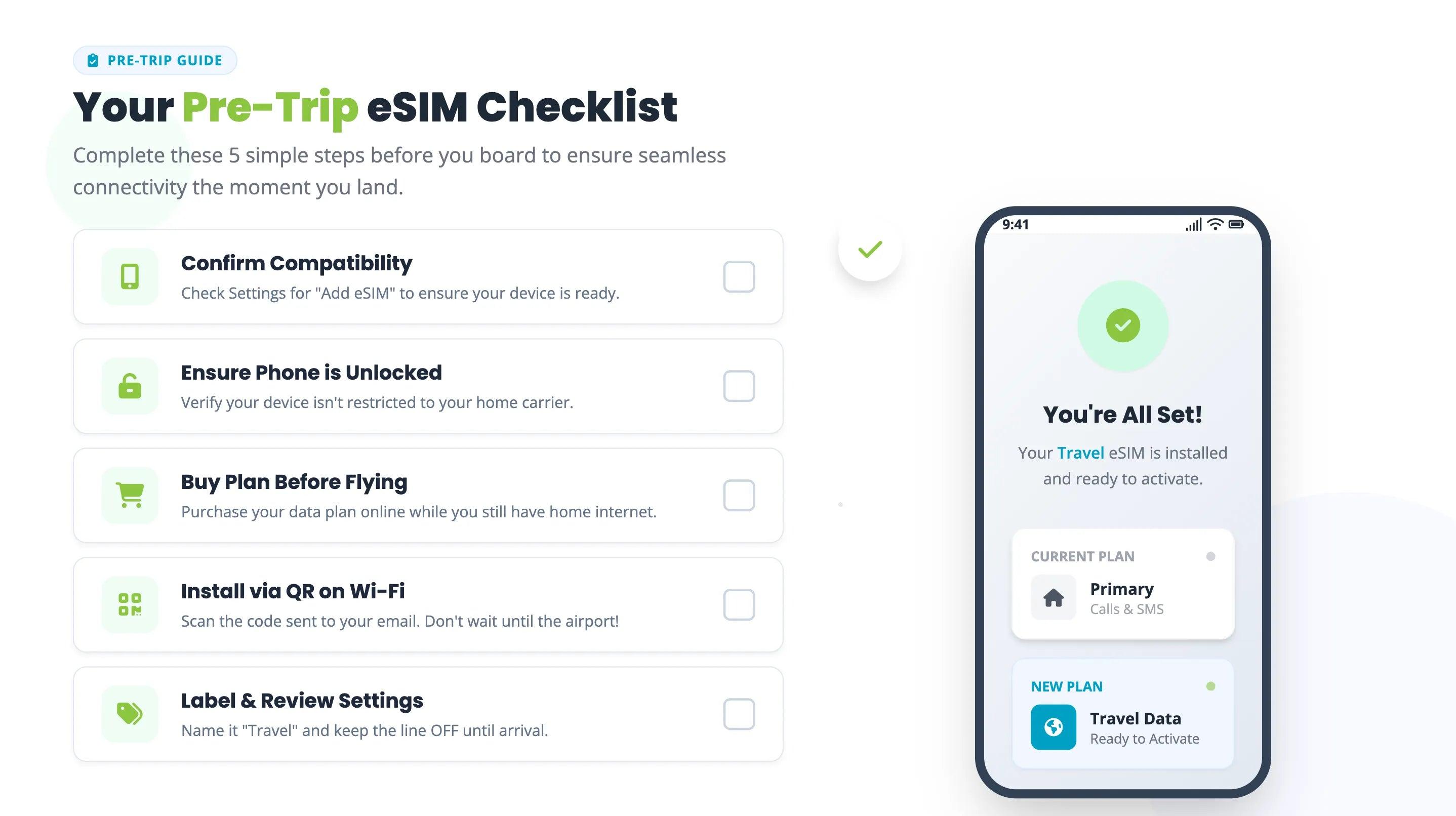
Connections:
- Purchase and install your OvoSIM China eSIM — but don't activate it until you land
- Install a VPN app (ExpressVPN or NordVPN) as backup for hotel Wi-Fi
- Download offline Google Maps or Amap maps for your destination cities
Payments:
- Download Alipay, create account, link your foreign card, complete passport verification
- Download WeChat, register with your home number, set up WeChat Pay as backup
Getting around:
- Register for Didi (or confirm it's accessible through Alipay mini-program)
- Download Google Translate with Chinese language pack for offline use
Tickets and bookings:
- Book any high-speed rail tickets in advance (Trip.com works well in English)
- Save hotel addresses in both English and Chinese (screenshot or notes — no internet needed)
- Save your hotel address in Chinese characters to show taxi drivers
Coverage in China: Cities, Trains, and Remote Areas

The OvoSIM China eSIM runs on China's major carrier networks, giving you strong coverage across the country's most popular travel routes.
Coverage breakdown:
| Location | Coverage Quality |
|---|---|
| Beijing, Shanghai, Shenzhen, Guangzhou | ✅ Excellent — 4G/5G |
| Xi'an, Chengdu, Hangzhou, Nanjing | ✅ Excellent |
| Smaller cities and county towns | ✅ Good 4G |
| High-speed rail (Beijing–Shanghai, Beijing–Xi'an) | ✅ Reliable — brief drops in tunnels |
| Metro systems (subway tunnels) | ⚠️ Signal drops in tunnels, reconnects quickly |
| Rural areas and countryside | ✅ Generally good on major routes |
| Tibet (Lhasa and main tourist areas) | ⚠️ Available but limited — download offline content |
| Xinjiang | ✅ Available in major cities |
On high-speed trains: Connectivity is reliable on China's HSR network. You'll experience brief signal drops inside tunnels, which is normal — the connection re-establishes quickly when you exit. For a Beijing–Shanghai journey (around 4.5 hours), expect consistent data with a handful of brief interruptions.
Can I Use Alipay and WeChat Pay With an eSIM?
Yes — and this is a question that causes a lot of confusion online.
Alipay and WeChat Pay are Chinese apps that function on Chinese domestic networks. Some travelers worry that using an international eSIM (with data routed outside China) will interfere with these apps.
It doesn't. Here's why: Alipay and WeChat Pay communicate with their own servers, which are accessible from any network — including international eSIM roaming. The payment QR codes work regardless of whether your data exits through a Chinese or international gateway.
What you actually need for Alipay/WeChat Pay:
- A working internet connection (eSIM provides this ✅)
- A linked foreign credit/debit card (set up at home ✅)
- Passport verification completed (done at home ✅)
The combination of an international eSIM + Alipay is the standard setup for foreign tourists in China in 2026. It works.
How Much Data Do You Need?
China is a data-hungry destination. You'll be using maps constantly, translating menus and signs, calling Didis, scanning QR codes, booking trains, and staying in touch with people back home.
Recommended data by trip type:
| Trip Type | Duration | Recommended Plan |
|---|---|---|
| City break (Beijing or Shanghai only) | 3–5 days | 5GB |
| Standard multi-city trip | 7–10 days | 10GB |
| Extended trip across multiple regions | 14–21 days | 20GB or unlimited |
| Business travel with heavy usage | Any | Unlimited |
Tips to manage data:
- Download offline maps before you go — this saves significant data
- Use hotel Wi-Fi (with VPN) for streaming and large downloads
- Google Translate camera mode uses data — download the offline language pack instead
- WeChat and Alipay can be data-hungry — factor this into your estimate
If you run out mid-trip, you can top up your OvoSIM plan directly through ovosim.com using your home card — no Chinese payment system required.
How to Set Up Your OvoSIM China eSIM
Getting connected takes about 5 minutes and should be done at home before you fly.
- Go to ovosim.com/esim/china and choose your plan
- Pay with your home card — Visa, Mastercard, or Apple Pay
- Receive your QR code immediately by email
- Go to Settings → Cellular → Add eSIM (iPhone) or Settings → Mobile Network → Add eSIM (Android)
- Scan the QR code — the profile installs in under a minute
- Label the line "China Data" and keep it turned off until you land
- On arrival in China, enable the eSIM line and turn on Data Roaming
- You're connected — Google, WhatsApp, Instagram all work immediately 🎉
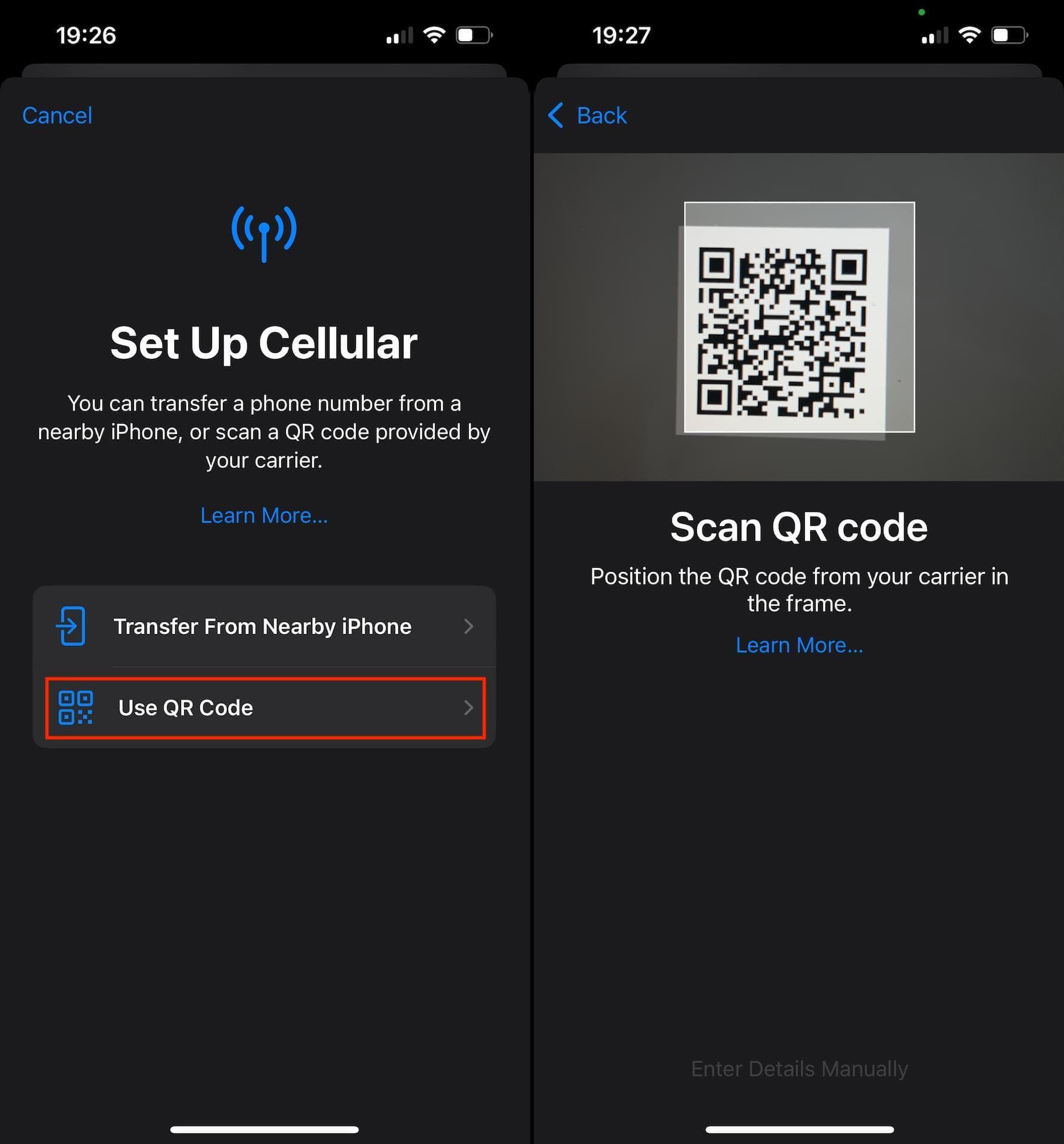
Important: You cannot purchase a new eSIM plan from inside mainland China due to local internet restrictions. Buy and install it before you board.
Quick Reference: Everything You Need to Know
| Question | Answer |
|---|---|
| Does eSIM work in China? | ✅ Yes — fully |
| Does it bypass the Great Firewall? | ✅ Yes — through international roaming |
| Do I need a VPN for mobile data? | ❌ No — eSIM handles it automatically |
| Do I need a VPN for hotel Wi-Fi? | ✅ Useful — hotel Wi-Fi routes through Chinese ISPs |
| Does Google work? | ✅ Yes |
| Does WhatsApp work? | ✅ Yes |
| Does Instagram work? | ✅ Yes |
| Does YouTube work? | ✅ Yes |
| Does Alipay work with eSIM? | ✅ Yes |
| Does WeChat Pay work with eSIM? | ✅ Yes |
| Does it work on high-speed trains? | ✅ Yes — brief drops in tunnels |
| Can I buy eSIM after arriving in China? | ❌ No — buy before you fly |
| Can I use it as a hotspot? | ✅ Yes |
| Does it work in Hong Kong? | ✅ Yes (no firewall there anyway) |
| Does it work in Tibet? | ⚠️ Limited in remote areas |
Frequently Asked Questions
Do I need a Chinese phone number to use Didi, Alipay, or WeChat? No. You can register and use all three with your home country phone number. Didi specifically states you do not need a +86 number to sign up.
Can I buy an eSIM after I've already arrived in China? No. Due to local internet restrictions, eSIM provider websites and apps are blocked in mainland China. You must purchase and install your eSIM before you enter the country.
Will my iPhone work with an eSIM in China? Yes. All iPhones from the XR (2018) onwards support eSIM and work in China. iPhone 14 and later models in the US are eSIM-only (no physical SIM slot) — these work perfectly with a travel eSIM in China.
Does the eSIM work in Hong Kong and Macau? Yes. Both operate outside the Great Firewall and have unrestricted internet. If you're transiting through Hong Kong before entering mainland China, it's an ideal place to finish setting up Alipay, WeChat, and any other apps you need.
What network does the OvoSIM China eSIM use? OvoSIM connects to China's major carrier networks, providing reliable 4G/LTE coverage across all major cities, tourist routes, and the high-speed rail network.
Can I keep using my WhatsApp number? Yes. Your WhatsApp stays linked to your home SIM's number. The eSIM is a separate data-only line — your calls and WhatsApp continue through your original number normally.
Is using an international eSIM legal in China? Yes. International travel eSIMs are completely legal in China. They are standard international roaming services. There are no legal restrictions on tourists using them.
What if I go over my data limit? You can top up your OvoSIM plan directly through ovosim.com using your home card. No Chinese bank account or payment system required.
The Bottom Line
Traveling to China in 2026 without an international eSIM is genuinely difficult — hotel Wi-Fi is restricted, local SIM cards require registration and a Chinese-compatible payment method, and roaming on your home carrier is expensive and still subject to the firewall.
A travel eSIM solves all of it in one step. You arrive connected. Google, WhatsApp, Instagram, and every other app you rely on work immediately — no VPN configuration, no airport SIM kiosk queue, no guesswork.
The one thing to remember: set everything up before you fly. Your eSIM, Alipay, WeChat, and Didi all need to be installed and configured while you still have unrestricted internet access at home.
→ Get Your China eSIM — Plans from €4.99
Visiting other countries on your trip? See our guides for Japan eSIM, South Korea eSIM, Hong Kong eSIM, Vietnam eSIM, and Thailand eSIM.
Also planning a trip to Russia? Read our guide: Can You Buy a SIM Card in Russia as a Tourist in 2026?
OvoSIM monitors connectivity policies and updates this content regularly. Last reviewed: May 2026.