
How to Enable Calling and Texting on your eSIM (Wi-Fi Calling)
OVOSIM Support Team · Updated May 2026
VoIP Calling and Texting
You can make and receive calls using your regular phone number if your home carrier supports Wi-Fi Calling. When enabled, your phone connects to your home carrier's network over the internet using the OVOSIM data connection (VoIP). This lets you make and receive calls and texts with no roaming fees and no additional costs, because the call travels over the data connection rather than the cellular voice network.
You can also use WhatsApp and other apps linked to your phone number — these will use the OVOSIM data connection automatically with no setup required. Installing an OVOSIM eSIM will not change your WhatsApp number.
How to Enable Wi-Fi Calling
Follow the steps below to enable Wi-Fi Calling on your iPhone:
- Open Settings → Cellular
- Make sure Default Voice Line is set to Primary (your regular phone number)
- Under SIMs, tap Primary (your regular phone number)
- Make sure Turn On This Line is ON
- Find Wi-Fi Calling and set it to ON
- Make sure Data Roaming is set to OFF on this line
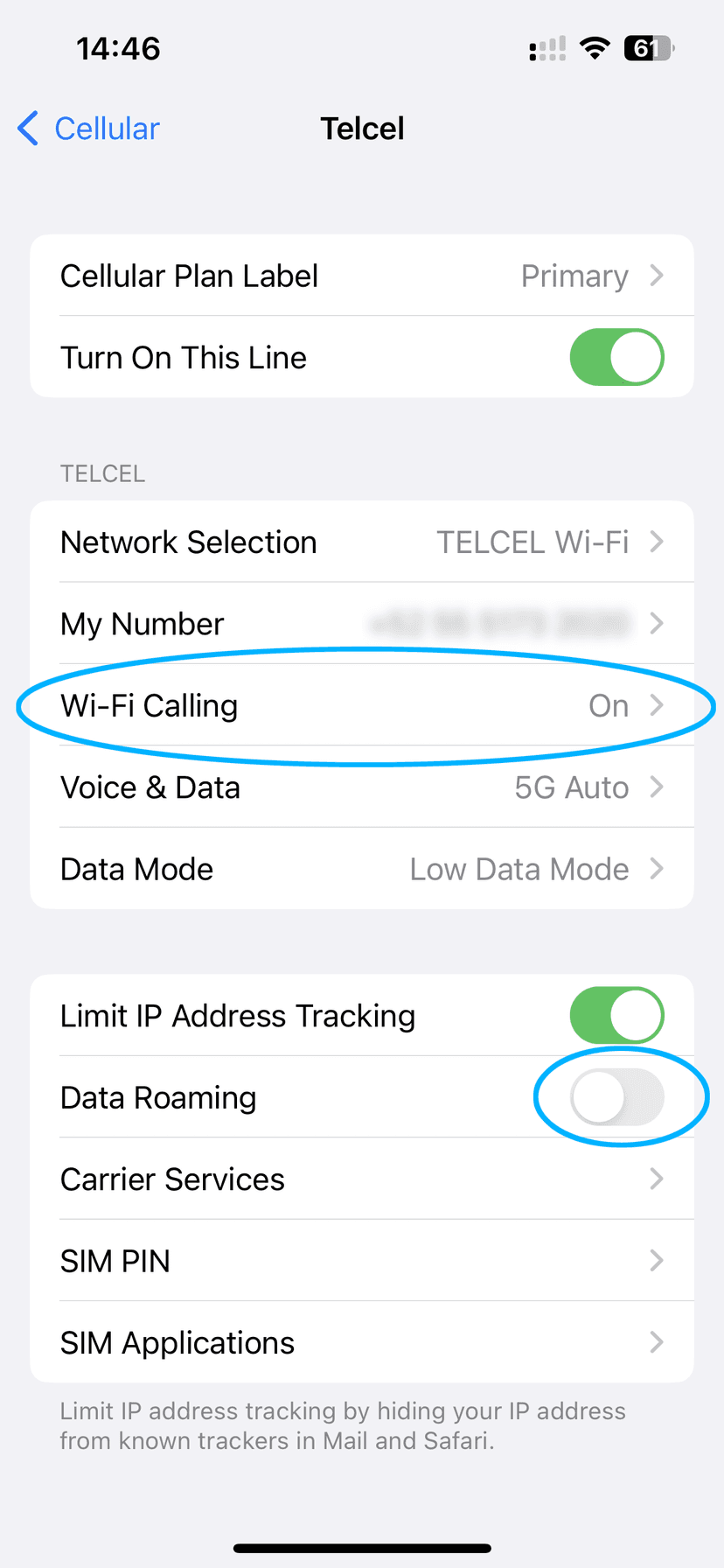
Using Wi-Fi Calling
When Wi-Fi Calling is enabled, your phone will use any available internet connection — OVOSIM data or Wi-Fi — to connect to your home carrier. You should see something like "Carrier Wi-Fi" in your status bar, where "Carrier" is your home carrier's name.
When active, your Primary line will automatically receive SMS and calls via the OVOSIM internet connection.
If the Wi-Fi Calling option is not available under your Primary plan, it is not supported by your home carrier. This capability is carrier-dependent and is not related to OVOSIM.
Local Phone Number
OVOSIM eSIM plans are data-only and do not include a local phone number in the destination country. Wi-Fi Calling uses your existing home number over the data connection.
Carrier Roaming Charges
OVOSIM data plans are designed to replace your home carrier's roaming plan and prevent additional roaming charges. When the eSIM is installed and configured correctly:
- Data roaming charges — will not be charged as long as the eSIM is configured correctly and Data Roaming is turned OFF on your Primary line.
- International call charges — may be charged by some home carriers even when using Wi-Fi Calling. This is not common but depends on your carrier.
- International SMS charges — may be charged by some home carriers even when using Wi-Fi Calling. Again, not common but carrier-dependent.
Important: OVOSIM does not interact with your home carrier and has no control over your phone plan. Always contact your home carrier directly to confirm whether any roaming fees apply when using Wi-Fi Calling abroad.